


TradingView indicators
Live your everyday life.
Clarity to trade.
Whether you're starting out or trading for a living.
Our indicators mark BUY, SELL and PEAK right on your chart: you enter on the signal and close on the peak — no guessing. For beginners and for people who trade for a living.
Beginners
If you're just starting
- Clear BUY / SELL / PEAK signals — you see when to enter and when to close.
- Signals print on candle close: they don't change afterwards.
- Alerts on your phone: no need to stare at the screen.
- Private Telegram channel and Louis to help you set it up.
Professionals
If you already trade seriously
- Use it on crypto, forex, indices and stocks, on any timeframe.
- Build your own strategies and offer them to your clients.
- Ready-to-use BUY/SELL/PEAK alerts you can route into your own setup.
- Works great on just one or two coins — total control.
100% hands-off
If you want it automated
- Connect the included Telegram channel to Cornix.
- Your trades open and close automatically, 24/7.
- Nothing to watch — the method runs for you.
- Cornix auto-trading channel coming soon.
Signal providers
If you run a service
- Perfect to provide signals or manage third-party portfolios.
- Clear, mechanical signals you can pass on.
- Highly recommended — ask us about special pricing.
- Real human support, always.
95% indicator · 5% trader
A simple, clear method
The indicator does the heavy lifting with BUY, SELL and PEAK alerts. You add a little feel and discipline. Follow the rules and you get the most out of it.
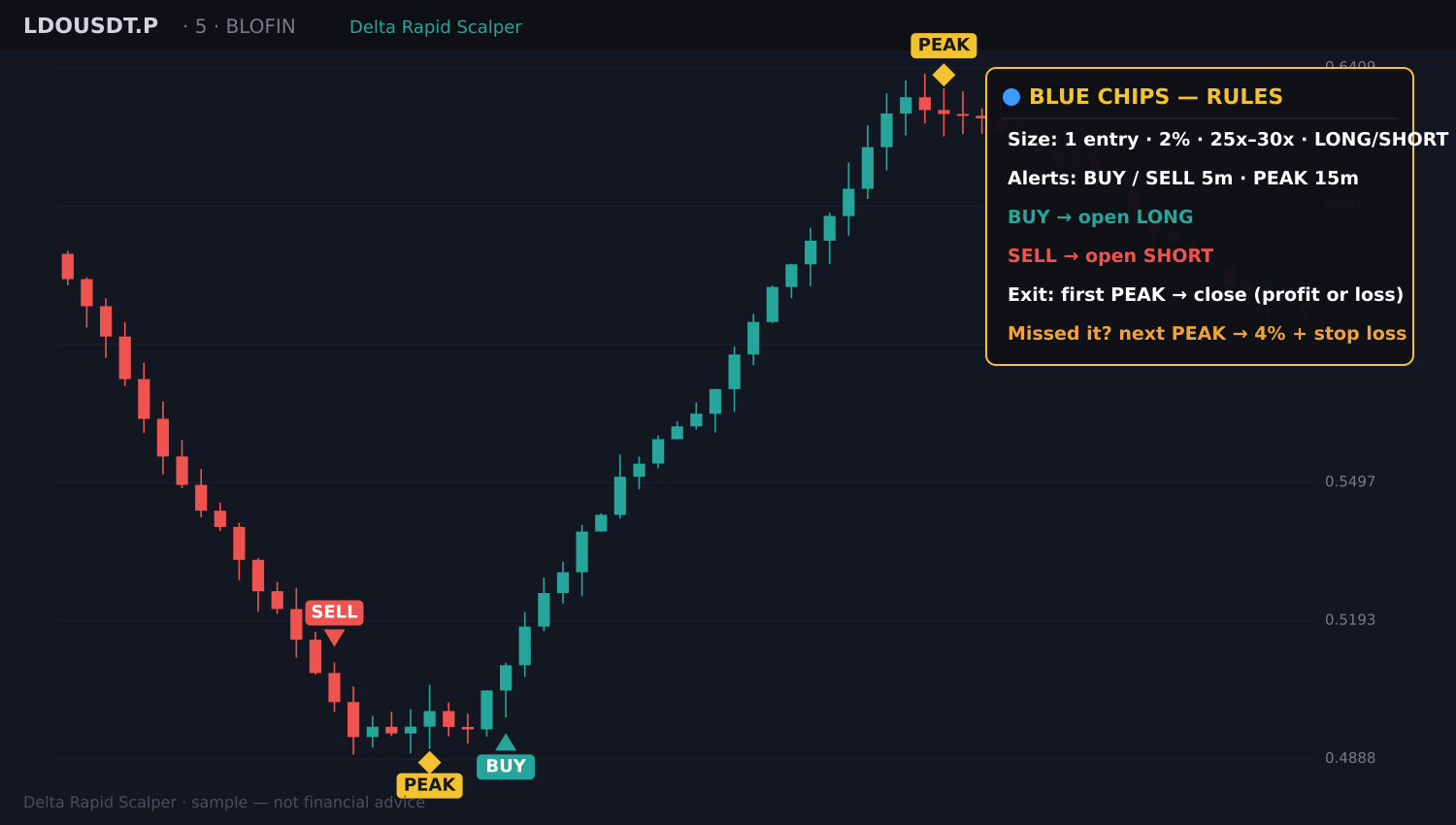
🔵 Blue chips
- BUY and SELL on the 5-minute chart, PEAK on 15-minute.
- BUY → go long. SELL → go short.
- Close on the first PEAK, in profit or in loss.
- One entry, 2% of the account, 25x–30x.
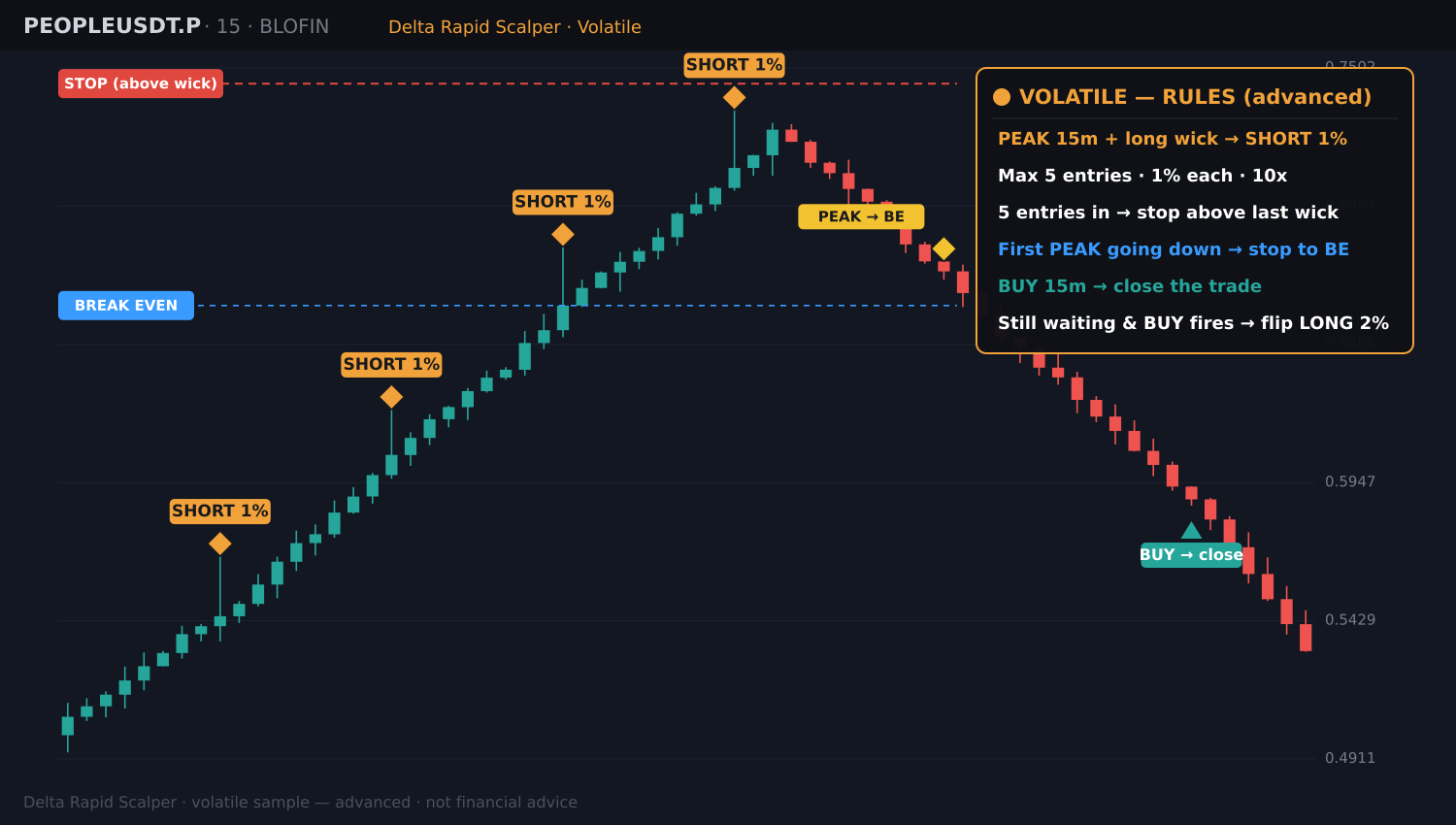
🟠 Volatile coins (advanced)
- Top 24h movers. PEAK 15m + long wick → short 1%.
- Up to 5 entries (DCA), 10x max.
- Stop above the last wick; move to break-even on the first peak down.
- Let it bleed and close on BUY.
Start small, build up
We recommend starting with a single trade: open it, close it. Then two at a time, then three… up to the 8 we recommend open at once (6 blue chips + 2 volatile). It's the best way to learn the method and get the most out of it.
What you need
A TradingView plan with at least 100 alerts (each blue chip uses 3, each volatile 2), a Telegram account, and — if you want it automated — Cornix.
Real human support
You're always helped by a real person on our team, not a bot. Louis walks you through everything.
Up and running in 5 minutes.
- 1
Message Louis on Telegram with your TradingView username.
- 2
He activates your free trial. The indicator shows up in your TradingView under Indicators → Invite-only scripts.
- 3
Add it to your chart and turn on the alerts. Done.
One monthly plan. Everything in.
- Our indicators on your TradingView, starting with Delta Rapid Scalper
- Private Telegram channel with the indicator's signals, ready to connect to Cornix if you want to automate them
- Every update
- Louis to help you set it up
Ask Louis for the price and this month's offers.
Want the full details?
Download the full user manual — the method, the blue-chip and volatile rules, how to start, the FAQ and how to automate it 100% with Cornix.